
Vegasino App for UK Players
We built the Vegasino App to run in your browser, not in a store. Open the site on your phone, log in, and 10,000+ games are in your pocket. Slots, live dealers, and sports betting on one screen. No download. 0 MB of storage. Pin the icon to your home screen in 15 seconds and it behaves like a native app. Every bonus, tournament, and VIP level stays live on mobile from your first tap.

Alternative Casino Applications
Most casino apps ask you to download 200+ MB from the store, and then give you half the game library on mobile. We went a different route. At Vegasino the full site runs in your browser with zero storage used, live dealer tables included. 10,000+ games on any screen. For UK players still comparing, a few other mobile casinos are listed below.











One more thing to watch for is payments. Some mobile casinos quietly disable certain deposit methods on the phone version. We keep all 18 options live across every device, same £10 minimum, same 0% fees, same crypto support. Same on every device. Open the site on your phone and see for yourself. Here is why we built it this way.
Why Use the Vegasino App
Nearly 80% of online gamblers now play on their phones. That is why the Vegasino Casino App is a progressive web App, not a store download. No stripped-down mobile version, no missing games. It is the full site. Every game, every market, every feature you see on a laptop loads the same way when you open it on your phone.
- 10,000+ games from 100+ providers : slots, table games, and live dealer rooms all load on mobile.
- Sportsbook with 30+ sports and live betting at the same odds you get on desktop
- Every payment method works on phone : cards, e-wallets, and crypto, all with 0% fees from £10.
- Full bonus system on mobile : Challenges, Tournaments, Bonus Crab, Shop, and VIP Levels.
- No storage taken on your device. The site loads fresh from your browser every time
- One account across all screens. Balance, history, and active bonuses sync instantly.

Same account, same balance, same product on any screen. Whether you add a shortcut or just type the URL each time is up to you. Three options, all work.
Vegasino Casino App Access Options
We give you three ways to reach the Vegasino Casino App from your phone : a home screen shortcut on Android, the same on iOS, or just typing the URL into any mobile browser. All three open the full site with no difference in what you can do. Most major platforms already work this way. No store listing can raise eyebrows, but the table below shows why a download is no longer necessary.
| Doubt | Reality |
| No app in the store | Runs in your browser, ready in seconds |
| Fewer games on mobile | All 10,000+ titles load on any screen |
| Eats up phone storage | 0 MB, nothing to download |
| Hard to find the site again | Home screen shortcut, one tap |
| Less secure than a native App | Same SSL, same login protection |
| Bonuses missing on mobile | Every promo, tournament, and VIP level |
| Updates need manual install | Refreshes itself every time you open it |
This approach is no less safe than anything you would get from the App Store or Google Play. We run the same encryption, the same servers, and the same verification on any device. Your account knows no difference. If you have never pinned a shortcut to your home screen before, the two walkthroughs below start with Android.
Android App Install
We set up the Vegasino App as a progressive web app, and Chrome on Android can install it directly. When you tap ‘Add to Home screen’ in Chrome, the system offers to install the site as a standalone app on your device. Same result, no store involved. The six steps below take about 15 seconds.
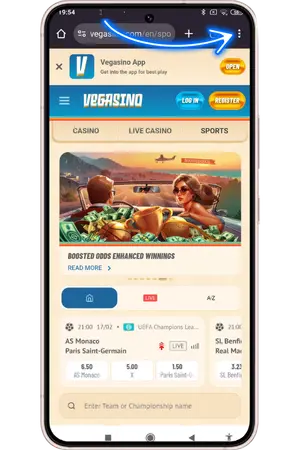
- Tap the three-dot menu
On vegasino.com, tap the icon ( ⋮ ) in the top right corner of Chrome to open the browser menu.
- Tap Add to Home screen
Find ‘Add to Home screen’ in the dropdown list and tap it.

- Choose Install over shortcut
Chrome gives you two options : ‘Install’ and ‘Create shortcut’. Tap ‘Install’. This registers the site as a full app on your device rather than a simple bookmark.

- Confirm the installation
A final prompt shows the Vegasino icon and site address. Tap ‘Install’ in the bottom right corner.

- The app opens full-screen
The site launches without an address bar or browser tabs. Everything loads exactly as it would on desktop.

- Find it on your home screen
The Vegasino icon now sits on your home screen alongside your other apps. One tap to open.

Six taps and it is done. Because you chose Install, Android treats the site as a standalone app. It shows up in your app drawer, you can manage it from settings, and the system even labels it ‘installed from Google Play Store’. Under 1 MB, nothing else to manage. iPhone and iPad work differently but the result is identical.
iOS App Install
Our site works natively with Safari, so adding the Vegasino Casino App to your iPhone or iPad takes five taps. The icon opens full-screen with a clean interface, just like a store App.
- Tap the Share icon in Safari. Open vegasino.com in Safari and tap the Share button (square with an arrow pointing up). Depending on your settings, it may appear at the top or bottom of the screen.
- Find Add to Home Screen. In the Share menu, look for ‘Add to Home Screen’. If you do not see it straight away, tap ‘More’ at the bottom of the list to reveal the full set of options.
- Tap Add to Home Screen Select ‘Add to Home Screen’ from the expanded list. This tells your iPhone to save the site as a standalone web app.
- Confirm and tap Add. A preview screen shows the icon and lets you edit the name. Make sure ‘Open as Web App’ is switched on, then tap ‘Add’ in the top right corner.
- Launch from your home screen. The Vegasino icon now sits on your home screen. Tap it and the site opens full-screen with no Safari interface. Your balance, games, and account are all right there.
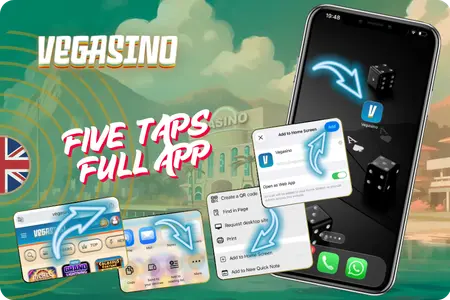
Safari handles everything behind the scenes : zero storage, automatic updates, and your device treats it like a real App. If you would rather skip shortcuts altogether, there is a third way that needs no setup at all.
Play in Browser No Install
We showed how to add a shortcut on Android and iOS. Both work well, and we stand behind that approach. The Vegasino App also runs directly in any mobile browser with full access to your profile and features. The shortcut gives you a few extras that are worth a quick look.
- Faster repeat loading. The shortcut caches files locally so pages open quicker after the first visit
- Stronger on weak signal. Cached data keeps the site steady when your connection drops.
- Full-screen mode. Address bar and tabs disappear, giving your games more room.
- One tap to launch from your home screen instead of typing the URL each time.
- Silent background updates. The site refreshes itself with no manual action from you.
- All browsers supported without a shortcut : Chrome, Safari, Firefox, Samsung Internet, Opera.
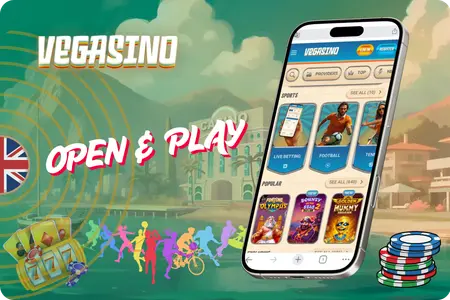
Play daily ? The shortcut saves time and bandwidth. Drop in once a month ? The browser is plenty. Same account either way. What matters next is keeping that account safe on any device.
Security Updates and Device Requirements
Player safety is how we operate, not an afterthought. The Vegasino App encrypts every page and every transaction the same way whether you are on a phone or a laptop. We hold international Anjouan Licence ALSI-152406028-FL2, and UK players are covered by it on any device. One standard, no exceptions.
| What | Details |
| Android | 5.0 or higher |
| iOS | 15.0+ with Safari |
| Browsers | All major mobile browsers |
| Connection | 3G, 4G, 5G, or Wi-Fi |
| Storage | Under 1 MB, with shortcut – 0 MB without |
| Encryption | Every page and payment, any device |
| First payout | ID, proof of address, payment screenshot |
| Spending controls | Deposit caps, loss limits, session reminders |
| Self-exclusion | Any time via settings or Live Chat |
| Support | Live Chat + [email protected], 24/7 |
| Official sources | vegasinouk.com and our Telegram channe |
We built all of this so you would not have to think about it. The encryption runs, the site updates, and your account stays protected on autopilot. Security works by default. If anything is still unclear, the answers below cover the most common questions.
Frequently Asked Questions
Yes. Android 7.0 or higher, iOS 14.0 or higher. No flagship needed. If your browser is current and you have a stable connection, the full library of casino games and live casino tables loads the same way it does on a new phone.
Your account security is identical on every device. We encrypt every page and every transaction with the same SSL protocol on phones, tablets, and desktops. Adding a shortcut to your home screen does not change that. Use a strong unique password for extra protection.
You can. Every responsible gaming tool works on mobile : deposit caps, loss limits, session reminders, and full self-exclusion. Open your profile, go to the Responsible Gaming section, or reach Live Chat any time.
We recommend Install. It registers the Vegasino Casino App as a standalone application on your phone, shows it in your app drawer, and Android labels it as installed from Google Play Store. Create shortcut is just a bookmark. Both open the site full-screen, but Install gives you a cleaner setup.
No. The site pulls the latest version every time you open it. No update prompts, no store downloads, no version numbers. Keep your browser and OS current and we handle the rest.
It is not. We do not have a native application in Google Play or the App Store. The only official way to install the Vegasino App is from our website. If you see a similar name in any store, it is not connected to us. Reach out via Live Chat when in doubt.